Reporting Bugs
Reporting bugs during the Beta stages of OneBrick is a critical step to helping us make the platform more solid and reliable over time.
How to Create A Bug Report
Within OneBrick Directly
Creating a bug report on any page is super easy! In the bottom right of every page you will see a bug icon:
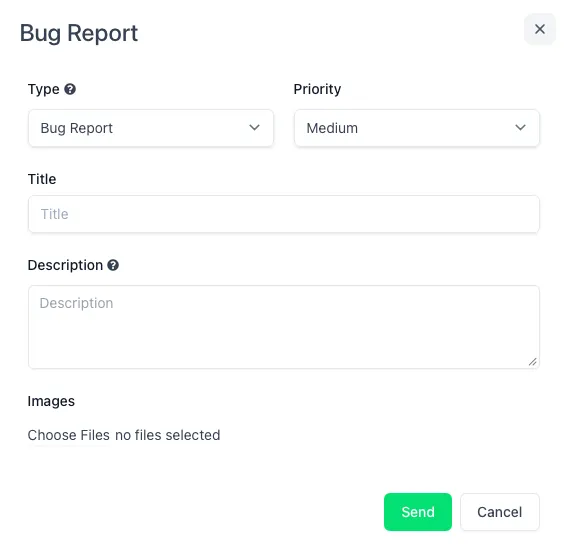
Simply click this icon and you will be presented with a bug report modal. Here you can input the Bug Type, Priority, Bug Title, and a long form Description you can use to describe the bug to us. You can also attach any screenshots or additional information you would like to send in the bug report.
When reporting a bug, the more information you are able to provide, the better. This method of bug reporting will create a bug in our development task management software. We will be provided with the user and tenant who sent the bug report and may need to reach out direcly to gather more information.
Discord Bug Reporting
The second method of reporting bugs within OneBrick is within our Discord channel. Once you have been invited to onboard, you will be given the option to join our OneBrick Beta Discord server.
Within this server, there is a dedicated channel called: #bug-reporting where you can create a new bug. This will then be manually investivated and loocked at by our Dev Team. You will almost most definitely be contacted to provide additional information about the bug when reported in this manner.
Email Bug Reporting
The third method of reporting bugs within OneBrick is by sending us an email direcly to: [email protected]
When sending us an email please provide as mych information as possible into explaining how the bug happened, what the issue what, what page you were one, what you were doing on the page, and what your expected outcome was. This will help us to diagnose the bug more quickly. If we need additional information about the bug, we will respond to your email to discuss what happened.